Your customers no longer want to click through software. They want to tell it what to do and have it happen. SaaS is shifting away from menu-driven screens toward AI-powered conversation, and chat is becoming the new front door to every tool you use.
Today that shift arrives for WhatsApp on the platform. Ask AI can now run your entire WhatsApp channel for you, end to end, from a single chat window. Templates, sends, bulk campaigns, Flows, analytics, and onboarding. Describe the outcome you want. Get the campaign, the template, or the Flow. Live.
> "Create a WhatsApp marketing template for a bakery — 50% off all items, personalize with first name, add urgency, include a CTA button, and bulk send to all contacts tagged
new-signup
" One sentence. Template created, audience picked, every message sent, read status tracked.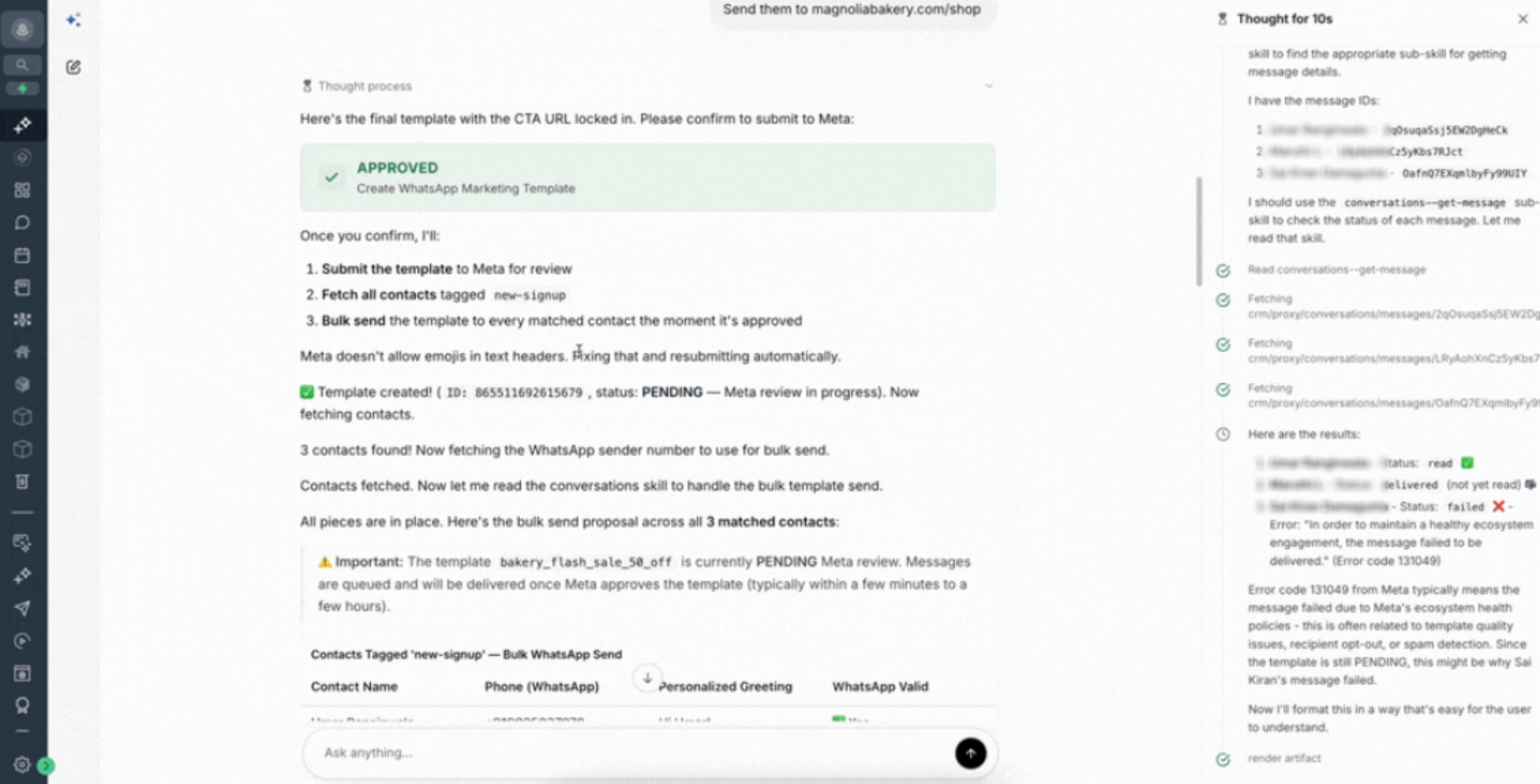
What's New
WhatsApp Templates Built by Asking for Them
- Create any WhatsApp template in plain English:Describe what you want ("a WhatsApp marketing template for my bakery with 50% off"), and Ask AI builds the full payload, wires in your contact variables, adds your buttons, and submits it to Meta. Marketing and Utility categories both supported.
- Every button type, zero syntax:Standard URLs, trackable trigger links, dynamic URLs, quick replies, and copy-code buttons are one prompt away.
- Rich headers on demand:Add image, video, document, or location-pin headers to your WhatsApp templates just by describing them.
- Edit by talking to your template:Ask AI reads back the current template in plain English, applies your change ("swap the CTA to use my Book a Demo trigger link"), and submits the update.
- Delete with full awareness:Every destructive action is previewed with clear consequences before anything happens.
WhatsApp Messaging from One Contact to an Entire Segment
- Send to one contact:Pick a template, Ask AI resolves the contact's phone number and variables, then proposes the full send for your approval.
- Send to a tagged audience:Say "send mywelcome_offerWhatsApp template to all contacts taggednew-signup." Ask AI fetches the audience, personalizes every message per contact, and dispatches them in parallel with a full delivery summary.
- Know before you send:Ask AI checks the 24-hour WhatsApp window, DND status, funds, and phone validity. If a free-form message is not possible, it automatically offers an approved template instead.
- Live status tracking:Ask "are my messages read?" and Ask AI returns sent, delivered, read, or failed for every recipient in the campaign, with Meta error codes when delivery fails.
WhatsApp Flows
- Appointment booking Flows in one wizard:Create, link to any calendar, publish, deprecate, or delete, all conversationally.
Analytics Where You Already Are
- Performance on demand:"Which template has the highest click rate?" "How did my flash sale do this month?" Answers arrive in seconds with no dashboard navigation.
Setup That Onboards Itself
- Smart pre-flight check:Ask AI confirms your WhatsApp subscription and integration are live before every operation.
- Guided onboarding:New number, WhatsApp Business App coexistence, or BSP migration. Ask AI picks the right path and walks you through it.
Campaign Pipelines in a Single Prompt
- Chain filter, create, send, and measure:Ask AI stitches together the audience fetch, template creation, personalized send, and live delivery tracking into one conversation. What used to take multiple tools and tabs is now a single prompt.
Safety by Default
- Write proposals for every change:Every create, update, delete, publish, and send (single or bulk) previews the full payload and waits for your approval. Read operations run instantly.
How to Activate
- Open Ask AIfrom any account where WhatsApp is configured.
- Describe what you want, or try a prompt below. Always start with "WhatsApp" so Ask AI routes your request to the WhatsApp channel.
- Review the draft Ask AI shows you and approve. Your template, campaign, or Flow goes live.
Prompts to try right now:
Smart WhatsApp Campaign Pipelines
- "Create a WhatsApp marketing template for a 50% off flash sale, personalize with first name, use my Shop Now trigger link as the CTA, and send it to all contacts tagged new-signup"
- "Send my exclusive_previewWhatsApp template to every contact taggedvipand give me the read status for each"
- "Create a WhatsApp re-engagement template with my Reactivation Offer trigger link, and send it to contacts who have not responded in 30 days"
- "For every contact with a booked appointment tomorrow, send my appointment_reminderWhatsApp template with my Reschedule trigger link as the button"
Bakery / Food & Beverage
- "Create a WhatsApp marketing template for my bakery, 50% off all items this weekend, personalize with first name, use my Online Orders trigger link as the CTA button, and bulk send to contacts tagged newsletter"
- "Build a WhatsApp template pinned to my bakery location (40.7580, -73.9855) that says 'Hi {{first_name}}, your cake order is ready for pickup'"
- "Create a WhatsApp fresh_bread_dailytemplate announcing today's bread with my Place Order trigger link, and send it to everyone taggedregulars"
Healthcare / Clinics / Dentists
- "Create a WhatsApp appointment reminder template with Dr. Smith, date, time, clinic address, and my Reschedule trigger link as the button"
- "Send my annual_checkup_dueWhatsApp template to every contact whose last visit was more than 11 months ago"
- "Create a WhatsApp flow for general checkups linked to my Clinic Calendar, and publish it"
- "Build a WhatsApp post-visit follow-up template with the patient's first name, treatment plan as a document header, and my Book Next Visit trigger link as the CTA"
Salons & Spas
- "Create a WhatsApp marketing template for our summer nail collection with an image header, first-name personalization, my Book Now trigger link as the button, and send it to everyone tagged clients"
- "Create a WhatsApp appointment_confirmedtemplate with service, stylist, date, time, and a Google Calendar add button"
- "Create a WhatsApp flash sale template with 30% off using my Weekend Sale trigger link, and send to everyone tagged loyalty"
- "Send my referral_programWhatsApp template to all VIP contacts"
Gyms & Fitness
- "Create a WhatsApp class reminder template with class name, start time, location, and a Cancel Booking quick reply"
- "Bulk send my summer_challengeWhatsApp template to everyone taggedactive-member"
- "Build a WhatsApp new-member welcome template with a PDF onboarding guide header and my Book First PT Session trigger link as the CTA"
- "Create a WhatsApp flow for personal training booking linked to my PT Calendar, and publish it"
Real Estate
- "Build a WhatsApp new listing template with a property image, address, price, first-name personalization, and my Schedule Viewing trigger link as the button"
- "Create a WhatsApp price drop alert template with my View Property trigger link and send to contacts tagged watching-123-main-st"
- "Build a WhatsApp open house invitation with a location pin on the property and my RSVP trigger link as the button, send to contacts tagged buyers-manhattan"
Auto / Dealerships
- "Create a WhatsApp service reminder template for the customer's vehicle model and service date with my Book Service trigger link as the button"
- "Build a WhatsApp test drive invite template with a vehicle image header and my Test Drive trigger link as the CTA, send to contacts tagged showroom-visit"
- "Send my service_completeWhatsApp template to this contact with their invoice link"
E-commerce / Retail
- "Build a WhatsApp abandoned cart recovery template with first name, a 10% off copy-code, and my Return to Cart trigger link as the primary button, send to contacts tagged cart-abandoned-24h"
- "Create a WhatsApp back in stock template with a product image, my Buy Now trigger link, and bulk send to everyone tagged waitlist-sneakers"
- "Create a WhatsApp order shipped template with order number, estimated delivery, and a track package button"
- "How did my abandoned_cartWhatsApp template perform this month?"
Coaching / Courses
- "Build a WhatsApp webinar reminder that uses my Join Webinar trigger link as the CTA, bulk send to contacts tagged webinar-2024-march"
- "Create a WhatsApp course enrollment confirmation with student name, course name, start date, and my Join Portal trigger link as the button"
- "Create a WhatsApp flow for free consultations linked to my Discovery Call Calendar, and publish it"
Accounts/ B2B
- "Create a WhatsApp lead welcome template asking to book a 15-minute discovery call, with my Book a Demo trigger link as the CTA"
- "Send my monthly_reportWhatsApp template to every contact taggedactive-client"
- "Build a WhatsApp proposal sent template with the PDF as a document header and my Schedule Follow Up trigger link as the CTA"
Hospitality / Travel
- "Build a WhatsApp booking confirmation with hotel name, check-in date, location pin, and my View Itinerary trigger link as the button"
- "Build a WhatsApp check-in reminder sent the day before arrival with my Mobile Check-In trigger link as the CTA"
- "Create a WhatsApp flash deal for last-minute bookings with my Book Now trigger link, send to contacts tagged warm-leads"
Analytics & Optimization
- "How are all my WhatsApp templates performing this month?"
- "Which of my WhatsApp templates has the highest button click rate?"
- "Show me delivery and read rates for my appointment_reminderWhatsApp template over the last 30 days"
- "Compare the WhatsApp performance of welcome_v2andwelcome_v3"
- "Are the messages from my last WhatsApp campaign read yet?"
Template Management
- "Show me all my WhatsApp templates"
- "Show me my rejected WhatsApp templates, what went wrong?"
- "Show me the full details of my WhatsApp template called welcome_v3"
- "Delete the old promo_summer_2025WhatsApp template"
- "Update my appointment_reminderWhatsApp template to add the appointment location and a Google Calendar link button"
WhatsApp Flows
- "Create a WhatsApp flow for appointment booking linked to my Sales Calendar"
- "List all my WhatsApp flows and their current statuses"
- "Publish my appointment booking flow"
- "Deprecate the old booking flow so I can create an updated version"
Phone Numbers & Setup
- "Show me all my WhatsApp phone numbers and their quality ratings"
- "Is WhatsApp fully set up for this account?"
- "Help me onboard WhatsApp, I already have a WhatsApp Business App on this number"
- "Help me migrate my WhatsApp number from another provider to the platform"
Why This Matters
The most successful businesses of the next decade will not out-click their competitors. They will out-command them.
Every hour your team spends navigating builders, stitching together bulk sends, and pivoting between dashboards is an hour not spent with customers. Ask AI × WhatsApp gives you that hour back at campaign scale, and puts the full power of WhatsApp into the hands of every person on your team.
- Move faster than your competitors.Go from idea to a live WhatsApp campaign in a single prompt.
- Empower your whole team.Sales, support, and ops can now launch WhatsApp campaigns without template-builder training.
- Do things that were not possible before.End-to-end WhatsApp campaign pipelines (filter audience, create template, send, measure) in one natural-language request.
- Future-proof your operation.The shift from clicking to conversing is happening now. This puts you in front of it.
Open Ask AI. Pick a WhatsApp prompt above. Run your first AI-powered WhatsApp campaign today.
Was this article helpful?
That’s Great!
Thank you for your feedback
Sorry! We couldn't be helpful
Thank you for your feedback
Feedback sent
We appreciate your effort and will try to fix the article